
Add runtime observations to your vulnerability review.
FDIE runs supported firmware binaries inside an isolated sandbox and records process execution, loaded libraries, crashes and behavior. Use these observations alongside static findings and coverage limits when reviewing a vulnerability.
Last updated September 16, 2026
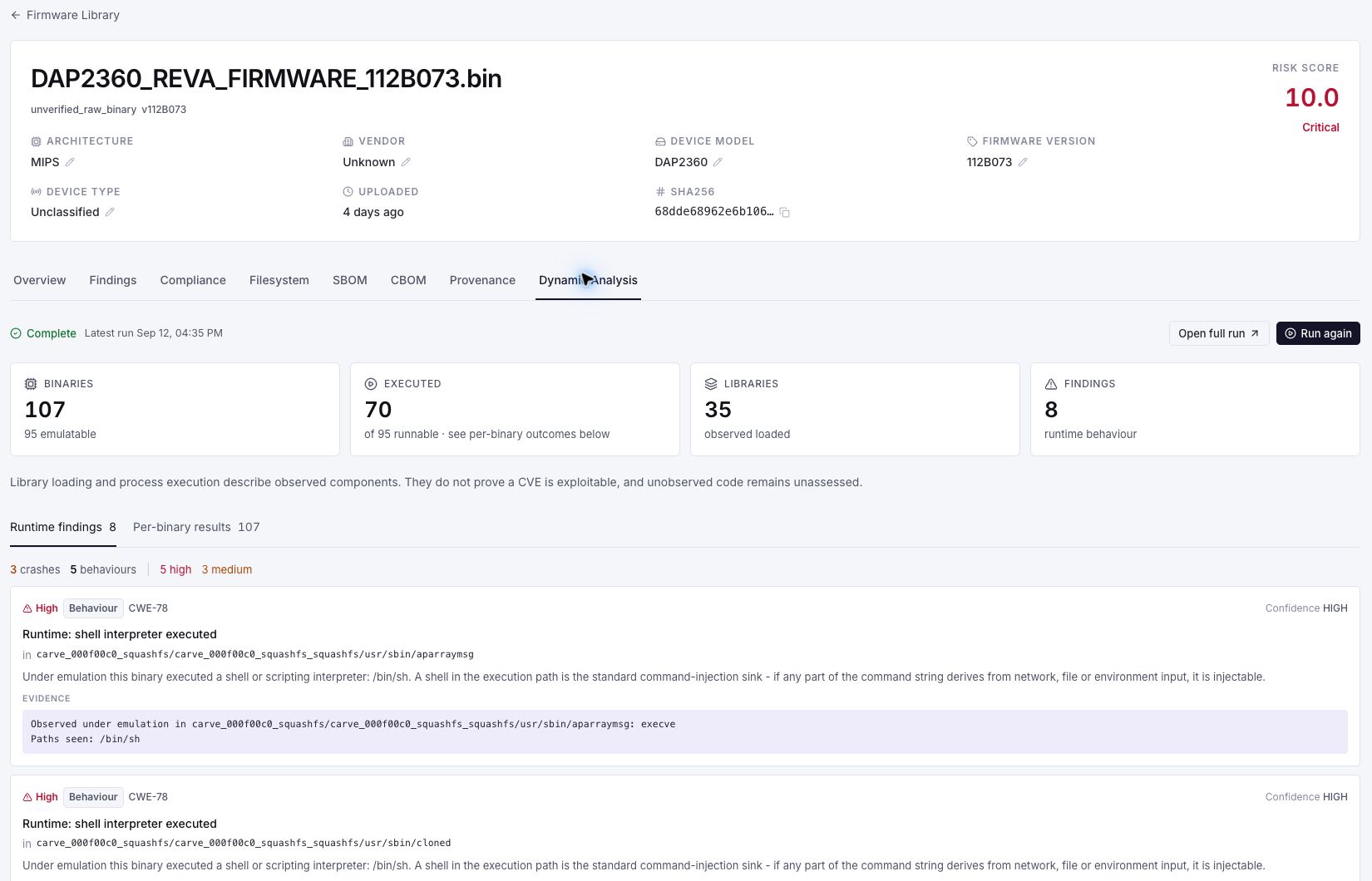
Inspect a recorded runtime run.
A closer look at runtime coverage and one recorded observation from an older DAP2360 firmware analysis. Enlarge the detail to read the evidence and its limits.
A CVE list is not a fix list.
A component or version match identifies a vulnerability candidate. Deciding whether it affects your product requires more context about the build, configuration and relevant code paths.
Dynamic analysis adds observations from a bounded emulation run. Review them alongside static evidence and the paths that were not exercised. Neither a loaded library nor a successful boot alone establishes CVE exploitability.
Choose methods the image supports.
Architecture support does not guarantee extraction, emulation or boot coverage. Linux, MCU and RTOS images need different methods; container and build metadata are static evidence, not runtime observations.
Per-binary emulation
Attempt execution of supported binaries in a bounded environment and record available process and library observations. Missing dependencies, hardware interfaces and unsupported instructions can limit coverage.
Full-system boot attempts
Attempt boot for supported Linux images and record observed startup activity. Custom kernels, peripherals and configuration can prevent or limit boot; a successful boot does not exercise every path.
MCU and RTOS metadata
Supported containers and build metadata can identify compiled components even where a filesystem or boot environment is unavailable. This static evidence is kept distinct from execution observations.
Coverage-guided fuzzing
Crafted inputs drive running binaries past the checks that hide a bug from a static scan. When a binary crashes, FDIE records the fault address, the input that caused it and the execution trace. Establishing the root cause and whether it is a security issue is a triage step, and the finding says so.
Every verdict names what was observed.
FDIE separates process execution, library loading and static component hints. These observations help prioritize review; they do not prove a vulnerable function was executed or justify a not-affected conclusion when a component was not observed.
That ordering is what makes the output defensible: an auditor can tell a runtime observation apart from a filename match without taking our word for it.
- Rung 1
Executed at boot
- Rung 2
Loaded at runtime
- Rung 3
Function imported
- Rung 4
Declared dependency
- Rung 5
Present, not linked
- Rung 6
Not observed
Bounded execution with recorded coverage.
Executing customer firmware is the most sensitive thing this platform does, so every run is boxed in before it starts.
Network
No network access
An emulated binary cannot reach the internet, the host, or another tenant. Firmware routinely phones home on start; here it cannot.
Filesystem
Read-only filesystem
Writes go to scratch space that is discarded, so nothing persists into the next run or back into storage.
Privileges
Zero privileges
All capabilities dropped, escalation blocked, non-root execution. A setuid binary inside an unpacked image gains nothing.
Resource limits
Hard resource ceilings
Memory, process count and wall-clock limits enforced from outside the sandbox, so a fork bomb or a hang bounds itself.
Where the evidence stops.
Dynamic analysis reports what it observed, and says so plainly when it observed nothing. Two limits are worth stating up front.
Encrypted vendor images
Without the vendor key there is nothing to unpack. FDIE reports that, rather than inferring a result from an image it could not read.
A boot is not a full run
Emulation exercises the paths a device takes on start-up. Code reached only by a specific request or configuration may not be observed, so "not seen" is never reported as "not present".
Evaluate runtime coverage for your image.
Review a sample comparison with us. Then scope a supported image pair, hosting requirements and the evidence your team needs to evaluate.
21-day free trial on the full platform. No card, no automatic conversion.